
Based on Google’s internal framework, this is how we build a common language for prompting.
Prompt engineering isn’t just about asking AI to do things — it’s about learning to speak a new language. As models become more capable, knowing how to frame your request matters just as much as what you’re asking. These 10 prompting techniques, inspired by Google’s internal framework, give us a shared vocabulary for working with large language models — and help us get better, clearer, more reliable results.
1. Zero-Shot Prompting
Just tell the model what to do—no examples needed.
Zero-shot prompting is the simplest technique in prompt engineering. It involves giving the model a direct instruction or question without any sample answers or demonstrations. Despite its simplicity, it can be surprisingly effective — especially for well-defined tasks the model has seen many times during training.
Use it for things like sentiment analysis, summarization, or straightforward classification tasks. It’s fast, clean, and useful when you want to keep prompts short or work within tight token limits.
But clarity is everything. If your wording is vague or ambiguous, you’re likely to get mixed results. Be precise and intentional in your phrasing to avoid creative drift.
Input:
Convert the following sentence into the passive voice:
The developer wrote the code.
Output:
The code was written by the developer.
Zero-shot prompting works best when your instructions are clear and direct. If the task is familiar to the model, sometimes all it takes is one well-phrased line.
2. One-Shot or Few-Shot Prompting
Show the model the pattern you want it to follow.
One-shot or few-shot prompting gives the model a handful of examples to mimic. This works well when your task requires structure, formatting, or nuance — things the model might struggle with on its own. By showing one or many examples, you’re essentially teaching the model a mini-lesson in the behavior you’re expecting.
The examples you give matter. Use high-quality, diverse, and well-structured examples that highlight edge cases and variations. Avoid repetition or ambiguity, or the model may lock into a pattern you didn’t intend. Include edge-cases when possible.
This technique is ideal when you want more reliable, consistent responses — especially when dealing with structured outputs like JSON, XML, or templated copywriting.
Let’s say you wanted to parse a pizza order into valid JSON. A few-shot example would give more than one example — usually 3 to 5 is preferred.
Input:
EXAMPLE 1:
“I want a small pizza with cheese, tomato sauce, and pepperoni.”{ “size”: “small”, “type”: “normal”, “ingredients”: [[“cheese”, “tomato sauce”, “pepperoni”]] }
EXAMPLE 2:
“Can I get a large pizza with tomato sauce, basil and mozzarella?”{ “size”: “large”, “type”: “normal”, “ingredients”: [[“tomato sauce”, “basil”, “mozzarella”]] }
Now parse:
“I’d like a large pizza, with the first half cheese and mozzarella. And the other tomato sauce, ham and pineapple.”
Output:
{
  "size": "large",
  "type": "half-half",
  "ingredients": [
    [
      "cheese",
      "mozzarella"
    ],
    [
      "tomato sauce",
      "ham",
      "pineapple"
    ]
  ]
}
Few-shot prompting gives the model something to imitate — turning vague requests into accurate, structured results.
3. System Prompting
Define the task. Set the rules. Control the output.
System prompts shape how the model behaves by defining the overarching task and desired format. These prompts are ideal when you want strict control over the structure of the response — like returning results in JSON, XML, or another machine-readable format. You can also use them to enforce tone, conciseness, or safety guidelines.
System prompting is especially useful in production environments where consistency matters. Think of it as setting the operating parameters of the AI before it even starts writing.
Input:
Classify the following review as POSITIVE, NEUTRAL, or NEGATIVE. Return your answer in uppercase.
Review: ‘Her’ is a disturbing study revealing the direction humanity is headed if AI is allowed to evolve unchecked. It’s so disturbing I couldn’t watch it.’
Output:
NEGATIVE
System prompts give you control, structure, and reliability — crucial when AI outputs need to be predictable, parseable, or production-ready. When precision matters, start by setting the system straight.
4. Role Prompting
Give the model a personality and point of view.
Role prompting lets you assign the model a specific persona — like a teacher, doctor, travel agent, or stand-up comedian. This helps ensure responses are framed in a way that’s aligned with the expectations and tone of that role.
This technique is powerful for customizing the voice of your AI. It’s also great for tailoring answers to a specific audience or context without having to repeatedly explain how the model should behave.
Input:
Act as a travel guide. I’m in Amsterdam and I want to visit only museums. Suggest three places.
Output:
Rijksmuseum — Dutch masterpieces including Rembrandt’s The Night Watch
Van Gogh Museum — The world’s largest collection of Van Gogh’s art
Stedelijk Museum — Modern and contemporary art from across the globe
Now change the prompt to humorous tone:
Input:
Act as a funny travel guide. I’m in Manhattan. Suggest three places to visit.
Output:
Empire State Building — Feel like King Kong minus the banana
MoMA — Question your stick-figure drawing skills
Fifth Ave — Where your wallet goes to cry
The assigned role and tone completely change how the model responds — without changing the underlying task.
5. Contextual Prompting
Add background so the model doesn’t guess.
Contextual prompts help the model give better answers by providing task-specific background information. This is key when the task involves nuance, domain-specific knowledge, or prior steps in a multi-turn interaction.
Context doesn’t need to be complex — it can be as simple as a one-line explanation of what you’re working on. But that small bit of setup can drastically improve the model’s focus and relevance.
Input:
Context: You’re writing for a blog about retro 1980s arcade games.
Suggest three article topics with descriptions.
Output:
The Evolution of Arcade Cabinet Design — From wood-paneled boxes to neon-lit showpieces
Blast from the Past: Iconic Arcade Games of the ’80s — Deep dive into titles that defined a generation
The Rise and Retro Revival of Pixel Art — From blocky sprites to modern indie nostalgia
Adding a single line of context transformed a vague brainstorm into blog-ready ideas.
6. Step-Back Prompting
Step back to move forward with smarter outputs.
Step-back prompting improves LLM performance by first asking a general or foundational question related to your task. Instead of diving straight into the final output, you let the model build context and surface relevant knowledge — before applying it to the specific request.
This method activates broader reasoning paths, helps the model think more creatively, and reduces bias by starting with principles instead of assumptions. It’s especially helpful when tackling complex, open-ended, or abstract problems.
You can use step-back prompting to:
- Explore themes or concepts before generating content
- Break down logic-heavy tasks
- Refine creative writing or idea generation
Here’s a traditional prompt one might use:
Write a storyline for a new level of a first-person shooter video game that is challenging and engaging.
And you would get a generic mission: ambush in a city, stealth combat, uncover enemy plans. Functional, but uninspired.
Now, let’s step back and provide context first:
Input:
What are 5 fictional key settings that contribute to a challenging and engaging level storyline in a first-person shooter?
Output:
Abandoned military base
Cyberpunk city
Alien spaceship
Zombie-infested town
Underwater research facility
Then we re-prompt using this new context:
Input:
Take one of the above themes and write a one-paragraph storyline for a new level of a first-person shooter game.
Output:
An elite marine descends into a dark, flooded research facility teeming with mutated sea creatures and eerie echoes of failed experiments. Players must solve puzzles, survive aquatic ambushes, and uncover the secrets of a deep-sea nightmare.
By prompting the model to explore possibilities first, the final result is richer, more specific, and more immersive.
7. Chain of Thought Prompting
Teach the model to think before it answers.
Chain of Thought (CoT) prompting improves reasoning by explicitly asking the model to break problems into steps before reaching a final answer. This technique is especially useful for tasks that require logical thinking, such as math, code generation, or complex decision-making.
By prompting the model with phrases like “Let’s think step by step,” you unlock its ability to walk through the reasoning process. This not only improves accuracy but also increases transparency — you can follow the logic, spot mistakes, and refine as needed.
CoT works well with zero-shot prompting, but becomes even more powerful with one or few-shot examples. It’s a low-effort, high-impact strategy that increases both performance and robustness across different LLM versions.
The tradeoff? More output tokens = higher cost. But the gains in reliability often outweigh the expense.
Traditional prompt (fails):
Input:
When I was 3 years old, my partner was 3 times my age. Now I am 20. How old is my partner?
Output:
63 years old
Wrong, and nonsensical. Now, let’s see how a chain of thought prompt might look:
Input:
When I was 3 years old, my partner was 3 times my age. Now I am 20. How old is my partner? Let’s think step by step.
Output
I was 3 years old.
My partner was 3 × 3 = 9 years old.
Age difference = 6 years.
I am now 20 → my partner is 20 + 6 = 26 years old.
26 years old.
Use Chain of Thought prompting any time a task involves multiple reasoning steps. If you’d “talk it through” with a human, you should try it with an LLM.
8. Self-Consistency Prompting
Ask multiple times. Trust the majority.
Self-consistency prompting improves LLM accuracy by running the same reasoning-based prompt multiple times, encouraging diverse thought paths, and choosing the most frequent final answer. It’s like brainstorming with the model several times — then voting on the best conclusion.
This technique builds on Chain of Thought by addressing one of its limitations: a single response path may be wrong or biased. By sampling at a higher temperature, you generate multiple perspectives, extract each final answer, and use a majority vote to select the most reliable outcome.
It’s a powerful method for:
- Reducing one-off hallucinations
- Improving reasoning accuracy
- Providing a soft confidence metric (more agreement = more certainty)
The tradeoff? It’s compute-heavy. More runs = higher cost.
For example, let’s say you gave an LLM a classification task:
Classify the following email as IMPORTANT or NOT IMPORTANT. Let’s think step by step.
Then you received the following email:
“Hi, I found a JavaScript bug in your contact form… It triggers an alert when entering a name. It’s a fun site though — feel free to leave the bug in there! Cheers.”
Instead of producing a single output, you could produce three outputs with different types of prompts, to ensure accuracy:
- Attempt 1:
Identifies security implications → Conclusion: IMPORTANT - Attempt 2:
Casual tone, no urgency → Conclusion: NOT IMPORTANT - Attempt 3:
Emphasizes unknown intent and risk → Conclusion: IMPORTANT
Then, you could aggregate the responses into a single majority vote:
2 out of 3 answers say IMPORTANT → Final Classification: IMPORTANT
By aggregating multiple reasoning chains, self-consistency prompts help LLMs filter out noise, sharpen judgment, and reduce erratic outputs.
Use it when accuracy matters most — especially for logic-heavy or ambiguous tasks.
9. Tree of Thoughts Prompting
Don’t just think ahead — think in branches.
Tree of Thoughts (ToT) is a powerful evolution of Chain of Thought prompting. Rather than following a single linear reasoning path, ToT enables the model to explore multiple reasoning paths at once, evaluating and expanding ideas like a decision tree.
Each “thought” is a partial idea or step that can lead to multiple next steps. By branching from strong thoughts and pruning weak ones, the model arrives at better, more creative, and well-reasoned outputs — especially for tasks involving exploration, planning, or multi-step decision-making.
Think of it as brainstorming multiple solutions in parallel before deciding which to pursue.
Use ToT for:
- Strategy generation
- Planning & optimization problems
- Creative story branching
- Game-level generation
- Any complex task with multiple valid approaches
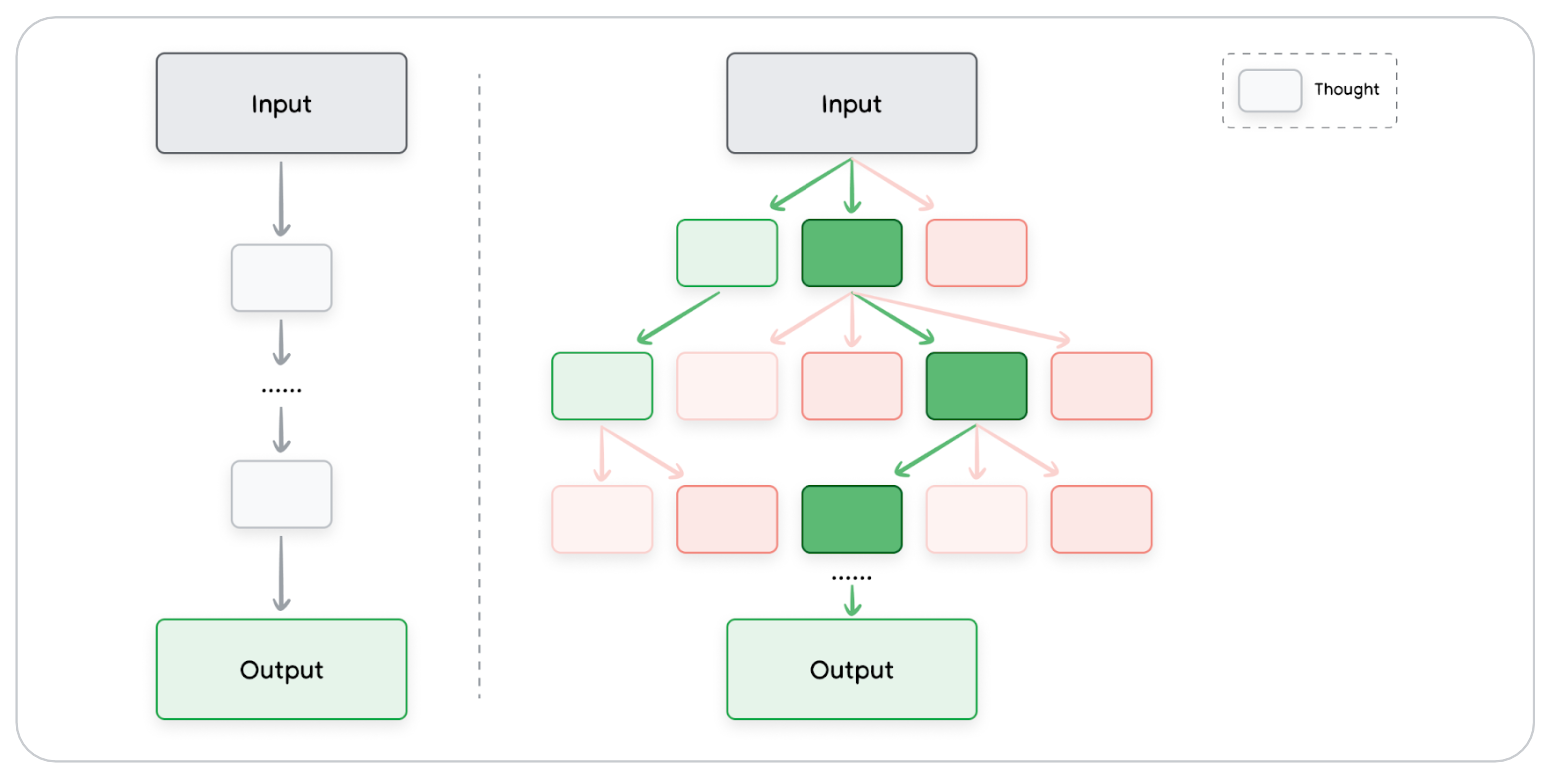
The image illustrates the difference:
Left — Chain of Thought:
- One path
- One solution
Right — Tree of Thoughts:
- Multiple parallel paths
- Evaluated and expanded
- Best path selected as final output
By considering more ideas, ToT helps large language models reason like expert problem solvers — not just guessers.
10. ReAct Prompting (Reason + Act)
Think, search, act — repeat.
ReAct prompting takes LLMs beyond static reasoning. It combines thoughtful language-based reasoning with external actions, like making API calls, searching the web, or running code. This interactive loop helps the model solve real-world problems in real time.
It mimics how humans approach problems:
- Think about the question
- Look something up
- Use new information to refine understanding
- Repeat until satisfied
The model follows a thought-action-observation loop, which makes it the foundation of agent-style applications. It’s ideal when answers require up-to-date information or multi-step discovery across tools.
For example, you could, using a small amount of code, give an LLM access to search the web. Then it can help provide answers to things with tools.
Input:
How many children do the band members of Metallica have?
ReAct solving:
- Thought — Metallica has 4 members.
- Action — Search “How many kids does James Hetfield have?” → 3
- Thought — 1 of 4 members has 3 kids
- Repeat for Lars, Kirk, Robert
- Final answer: 10 children in total
Key Benefits:
- Access live data
- Combine reasoning with search/tools
- Handle multi-step, complex queries
- Enables agent-like workflows
ReAct is one of the most powerful prompt frameworks when paired with code or tool execution — turning your LLM from a thinker into a doer.
The future of working with AI isn’t just knowing what to ask — it’s knowing how to ask it. Whether you’re prompting for structure, creativity, safety, or exploration, these 10 prompt types give you a flexible, shared foundation to build from. The more fluent we become in the language of prompting, the more powerful — and collaborative — our work with AI can be.

Leave a Reply